Showing posts with label Application. Show all posts

May 13, 2025

Indian Passport renewal process and documents

 Hi all,

Here is the updated process for renewing a passport for an adult and a child on the same day and time.


Appointment

  • Visit the India Passport Seva website
  • Click on "Register" if you don't have an account.
  • Click on "Login" if you already have an account.
  • After successful login, navigate to "Services".
  • Click on "Fresh Passport/Re-Issue of Passport"
  • Enter your existing passport number to pre-fill the data.
  • If it's a fresh passport or you want to manually enter the details, click on the "Skip for Now" link.
  • Choose the Passport Office
  • You should see the form below 
  • In the case of "Re-issue of Passport", you will have options to change/modify details in existing passport.
  • Check the appropriate items
  • When you check the "Change in Existing Personal Particulars", you will have options to update the following details.
  • After selecting the "Type of Application" and "Type of Passport Booklet"
  • Click on "Save and Next".
  • Post that you will be navigated tothe  next section as mentioned in the flow below.
  • Fill in the relevant details and submit the form.
  • After submitting the form, you will be able to upload the relevant documents that are available in the DigiLocker.
  • Select the center and date that you want to visit.
  • Note: It did not help me to smooth the process even after uploading the documents.


Visiting Center

  • Take all hard copies, Originals, and Xerox (2 sets)
    • Application form
    • Aadhaar Card (Full length)
    • Existing passport (Front 2 and back 2 Pages) Xerox (no print out with 100% page fill)
  • In case of a spouse's addition 
    • Marriage certificate original
  • For the kid application
    • Fill in "Annexure D"
    • Date of Birth Certificate
  • Counters
    • A Counter: Verification of the documents, scanning the documents, and taking a photo.
    • B Counter: Cross verification of the A counter form and documents.
    • C Counter: Originals will be verified.


Police Verification (Will be indicated in the status of the application after the center visit)

  • In a couple of days, the police will call and make sure you are available upon the visit at the address submitted in the passport application.
  • Submitted the application form that has been finalized during the center visit.
  • Original documents (Old passport(s) and address proof).
  • Details of the neighbour's & physical presence with a signature.
  • Applicant's signature and thumb along with a passport-size photo that will be stuck to the police filled application.

Please provide your feedback and comments on this blog or email me on psrdotcom@gmail.com


December 14, 2021

Fixing the Log4j2 vulnerability in spring boot application

 Hi all,

Software Industry was in a shock with the log4j2 zero day exploit.

Exploited area

The Apache Log4j2 version ( >=2.0 to <=2.14.1 ) is exploitable due to an attacker controlled LDAP and  JNDI endpoints.

Appendix

LDAP (Light Weight Directory Protocol) is an industry standard protocol to access directory services.

JNDI (Java Naming and Directory Interface) is a Java API for a directory service that allows Java software clients to discover and look up data and resources via a name.

Find more information about the vulnerability from NVD website link.

https://nvd.nist.gov/vuln/detail/CVE-2021-44228

NVD (National Vulnerability Database) is maintained by National Institute of Standards and Technology (NIST),  An official part of United States of America (USA) government's Department of Commerce.

Fix the vulnerability

  • Even in the latest spring boot package uses the vulnerable 2.14.1 log4j2 version.
  • So, we need to explicitly add the specific version in the properties as below
  • In pom.xml file, creating <properties> tag if not exists and add the attribute log4j2.version with version 2.16.0 (latest)

<properties>

    <log4j2.version>2.16.0</log4j2.version>

</properties>

  • To check the version applied to the project, run the following command
mvn dependency:tree | grep "log4j"
  • The result should look like below
[INFO] |  |  |  +- org.apache.logging.log4j:log4j-to-slf4j:jar:2.16.0:compile
[INFO] |  |  |  |  \- org.apache.logging.log4j:log4j-api:jar:2.16.0:compile

  • The similar type of vulnerability fixes available for other project builds.


Hope you will find the above information useful and fix the issue immediately to keep the servers safe from attacks.

Send your valuable feedback and comments to psrdotcom@gmail.com


February 11, 2020

Load balancing with IIS ARR Server Farm

Hi Folks,

I am going explain how can you create a software load balancer with IIS Web Server.
This method is HTTP based load balancing.

Pre-requisites


  1. IIS 7 and above
  2. ARR (Application Request Routing) https://www.iis.net/downloads/microsoft/application-request-routing
  3. Minimum two application servers, preferably running on two different machines

Create ServerFarm


  1. After installing the ARR, you should be able to see "Server Farms" in your IIS Server
  2. Right click on "Server Farms" and select "Create Server Farm"
  3. Give a name to the ServerFarm
  4. You would be navigate to "Add Server" Page
  5. Enter the application server/ip address and click on "Add"
  6. Repeat again to add two or more servers
  7. Check the status of the servers in "Server Address and Status" box
  8. Click on "Ok"

Configure Load Balance


  1. Select the created ServerFarm
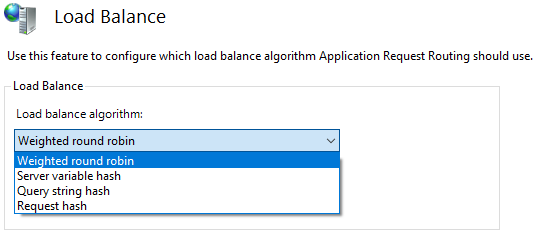
  2. Double click on the "Load Balance" item
  3. Choose the following based on your requirement.
  4. The default configuration as follows
    • Load balance algorithm: Weighted round robin
    • Load distribution: Even distribution


Based on the load balance algorithm, the load distribution options would be changed, if applicable.

Routing Rules Configuration


  1. Select the created ServerFarm
  2. Double click on the "Routing Rules" item

Monitor and Manage the servers

  1. Select the created ServerFarm
  2. Double click on the "Monitor and Management" item

Restart IIS

Once you have completed all the steps, perform the following to make sure everything is in sync.
  1. Open powershell in administrator mode
  2. Run the following commands
    1. net stop was /y
    2. net start w3svc


Please send your feedback and comments to psrdotcom@gmail.com

Deploy or Host ASP.NET Core web application in IIS

Dear folks,

Today I am going to explain the process of deploying the ASP.NET Core web application in IIS (Internet Information Services) web server.

Pre-requsites


Application configuration

To make sure the application deploys and works with IIS, you should add the following while creating the web host.

WebHost.CreateDefaultBuilder(args)
                   .UseKestrel()
                   .UseIISIntegration()
                   .UseStartup();
 Where Kestrel hosts the application and IIS will be acting as a reverse proxy.

Publish the application

After doing the changes, publish the application to a folder as self-contained as you no need to bother about the server for all the application dependencies.

Web Configuration


  • In Web.config, remove the following content
    • hosting="In Progress"
  • Copy files to IIS location
  • Create a website folder in IIS wwwroot folder
  • Copy the publish folder to the website folder
  • Example: C:\inetpub\wwwroot\website

IIS Application Pool


  • Create an application pool in IIS with following configuration
    • Name:
    • .NET CLR version: No Managed Code
    • Managed pipeline mode: Integrated


Website Configuration

  • Right click on the website and select "Add Application"
  • Give the following details
    • Alias:
    • Application Pool: Select above created application pool from list
    • Physical path: Select the above created website path
      • Example: C:\inetpub\wwwroot\website

Restart IIS

  • Once you have completed all the steps, perform the following to make sure everything is in sync.
  • Open powershell in administrator mode
  • Run the following commands
    1. net stop was /y
    2. net start w3svc

Test

Browse to the URL, you should be able to get the web pages.

Please send your valuable feedback and comments to psrdotcom@gmail.com


November 27, 2019

Virtual Reality (VR), Augmented Reality (AR), 3D Application Development Tools and Platforms

Hi folks,

Most of the developers think Unity is only the development platform to develop Virtual Reality (VR), Augmented Reality (AR), 3D Applications.

Here is the list which might be useful you to explore based on your skillset.


  1. Unity - C#
  2. Unreal - C++
  3. Apple SceneKit - Swift / Objective-C
  4. Google Sceneform - Android
  5. Amazon Sumerian - JavaScript
  6. Babylon - JavaScript - Try online Playground
  7. A-Frame - HTML JavaScript
  8. Three - JavaScript - Examples
Hope this information is useful for you to create your own applications based on your knowledge.

Make your dreams to real using the VR, AR, 3D technologies.

Please send your feedback and comments to psrdotcom@gmail.com

December 24, 2014

Android Application Upload to Google Play Store Minimum Requirements

Hi Friends,
Today, I have prepared a simple document which required once your signed application is ready (.apk file)

Pre-requisites

Google Play Developer Console account

Procedure

The following sections will explain the procedure of requirements

APK

In this section, you can upload the .apk for testing and production
We will have following tabs/sections for the following
1)   Production
2)   Beta Testing
3)   Alpha Testing 

Note:
For Beta and Alpha testing, tester e-mail ids shall be given to access the app)

  • Click on “Upload new APK” to upload the .apk file

Store Listing

App Info

1)   Title (max 30 characters)
2)   Short description (max 80 characters)
3)   Full description (max 4000 characters)

Graphic Assets for Android App Upload

  1. Screenshots
    • Default – English (United States) – en-US
    • JPEG or 24-bit PNG (no alpha). Min length for any side: 320px. Max length for any side: 3840px.
    • At least 2 screenshots are required overall. Max 8 screenshots per type. Drag to reorder or to move between types.
  2. Hi-res icon 
    • Default – English (United States) – en-US
    • 512 px x 512 px 32-bit PNG (with alpha)
  3. Feature Graphic 
    • Default – English (United States) – en-US
    • 1024 w x 500 h JPG or 24-bit PNG (no alpha)

Categorization

1)   Application type
2)   Category
3)   Content rating

Contact Details

1)   Website (Optional)
2)   Email

Privacy Policy

If you wish to provide a privacy policy URL for this application, please enter the privacy policy URL in the specified text box.

Note:
If we don’t have the privacy policy currently, we can skip by selecting “ Not submitting a privacy policy URL at this time” option.

Services and APIs

Licensing and In-app billing

Licensing allows you to prevent unauthorized distribution of your app. It can also be used to verify in-app billing purchases. Learn more about licensing.

Your license key for this application

We will be able to see a Base64-encoded RSA public key to include in your binary. Please remove any spaces. Add it to the, licensing source code of your program for verification with Google Play Store.

Please send your feedback and comments to psrdotcom@gmail.com

June 04, 2014

PhoneGap/Cordova iOS App Full Screen/Hide Status Bar completly

Hi Friends,

When we are working with cross platform application development like PhoneGap/Cordova, we might be facing issue with status bar.

Problem:
Status bar comes on the application though we want to have app in a full screen.

iOS Solution:
  • Add the following 2 keys in .plist file
    • view controller-based status bar appearance: NO
    • status bar is initially hidden : YES

I hope this will help you solving your issue.

Please send your feedback and comments to psrdotcom@gmail.com

December 12, 2013

Tatkal Passport Application required documents to apply in Hyderabad

Dear all,

I tried to apply tatkal in Hyderabad passport office with the documents specified in passportindia.gov.in. But when I reached after making an appointment, they said "Annexure F" is mandatory in Andhra Pradesh.

I was surprised, How come a normal person without any contacts of higher officials of State and Central government can apply for passport in tatkal mode??

The mediators will take around 5K and they will give this "Annexure F". That's cheating. I don't want to do that. Then eventually I have applied in normal mode. I don't know when I will get this. Mostly within one month of time, I should get my passport.


Lets see what happens.


If you are applying for passport in Normal mode then, you just need 2 documents.
  1. Residence Proof
  2. SSC Certificate
These two documents are enough to apply for a passport

If you are applying in tatkal mode, you need
  1. Residence Proof
  2. SSC Certificate
  3. Annexure F
  4. Annexure I
  5. Driving License (Alternates Avail in passport india website)
  6. PAN Card (-do-)
  7. Aadhaar Card (-do-)
So, concluding this note by saying that, apply passport in tatkal if you know some higher officials as per Annexure F.

October 03, 2013

Chennai Autorickshaw Old Vs. New Fare Android Application Lite Version

Hi all,

I have released the free version of chennai autorickshaw android app in google play.

Please look at this app and send your feedback.

https://play.google.com/store/apps/details?id=info.pillisureshraju.chennaiautokaasulite

Get it on Google Play


 Download it for free.

Scan QR
and install on your phone directly.


September 17, 2013

Android Virtual Device (AVD) Emulator Creation and Installing APK on Emulator Using Command Line

Dear friends,

Every time whenever we are using most of the Android developers are using Eclipse or some other IDE to create and start the AVD.

I was just thought of using it via command line in my Ubuntu because I was very lazy to start and wait for Eclipse to get ready. I just want to try some apk on Emulator.

Ubuntu Procedure


Open terminal
I was hoping that you had already included the Android tools, platform-tools in PATH. If not just do that else navigate to Android SDK directory

Create AVD:

Syntax: 
$ android create avd -n -t --abi

target-ids are based on the installed Android platforms. Its not the Android API Level.

abi(Application Binary Interface): The ABI is used to control which machine code will run on a given hardware device. For example, for an Android application to run on an x86 device, it is necessary to include x86 ABI support when compiling the application.

Example:
$ android avd -n MyJB -t 12 --abi armeabi-v7a

To view the target-ids list and supported ABI for target-id, execute the following command

$ android list targets

You might be getting some output similar to this

Available Android targets:
----------
id: 1 or "android-3"
     Name: Android 1.5
     Type: Platform
     API level: 3
     Revision: 4
     Skins: HVGA-P, QVGA-L, HVGA-L, HVGA (default), QVGA-P
     ABIs : armeabi
----------
id: 2 or "android-4"
     Name: Android 1.6
     Type: Platform
     API level: 4
     Revision: 3
     Skins: HVGA, QVGA, WVGA800 (default), WVGA854
     ABIs : armeabi
----------
id: 3 or "android-7"
     Name: Android 2.1
     Type: Platform
     API level: 7
     Revision: 3
     Skins: HVGA, QVGA, WQVGA432, WVGA800 (default), WQVGA400, WVGA854
     ABIs : armeabi
----------
id: 4 or "android-8"
     Name: Android 2.2
     Type: Platform
     API level: 8
     Revision: 3
     Skins: HVGA, QVGA, WQVGA432, WVGA800 (default), WQVGA400, WVGA854
     ABIs : armeabi
----------
id: 5 or "android-10"
     Name: Android 2.3.3
     Type: Platform
     API level: 10
     Revision: 2
     Skins: HVGA, QVGA, WQVGA432, WVGA800 (default), WQVGA400, WVGA854
     ABIs : armeabi, x86
----------
id: 6 or "android-11"
     Name: Android 3.0
     Type: Platform
     API level: 11
     Revision: 2
     Skins: WXGA (default)
     ABIs : armeabi
----------
id: 7 or "android-12"
     Name: Android 3.1
     Type: Platform
     API level: 12
     Revision: 3
     Skins: WXGA (default)
     ABIs : armeabi
----------
id: 8 or "android-13"
     Name: Android 3.2
     Type: Platform
     API level: 13
     Revision: 1
     Skins: WXGA (default)
     ABIs : armeabi
----------
id: 9 or "android-14"
     Name: Android 4.0
     Type: Platform
     API level: 14
     Revision: 3
     Skins: WXGA800, HVGA, QVGA, WQVGA432, WVGA800 (default), WSVGA, WXGA720, WQVGA400, WVGA854
     ABIs : armeabi-v7a
----------
id: 10 or "android-15"
     Name: Android 4.0.3
     Type: Platform
     API level: 15
     Revision: 3
     Skins: WXGA800, HVGA, QVGA, WQVGA432, WVGA800 (default), WSVGA, WXGA720, WQVGA400, WVGA854
     ABIs : armeabi-v7a, mips, x86
----------
id: 11 or "android-16"
     Name: Android 4.1.2
     Type: Platform
     API level: 16
     Revision: 4
     Skins: WXGA800, HVGA, QVGA, WQVGA432, WVGA800 (default), WSVGA, WXGA720, WXGA800-7in, WQVGA400, WVGA854
     ABIs : armeabi-v7a, mips, x86
----------
id: 12 or "android-17"
     Name: Android 4.2.2
     Type: Platform
     API level: 17
     Revision: 2
     Skins: WXGA800, HVGA, QVGA, WQVGA432, WVGA800 (default), WSVGA, WXGA720, WXGA800-7in, WQVGA400, WVGA854
     ABIs : armeabi-v7a, mips, x86

Start AVD

Syntax:
$ emulator -avd

Example:
$ emulator -avd MyJB

It will ask for you to customize, if you are interested and you have knowledge in the options then you can go ahead with custom emulator. Press "enter" to accept default options and your emulator will start within seconds.

Install APK on emulator

Syntax:
$ adb install

Example:
$ adb install MyApp.apk

It will install the apk on your emulator.
Go to apps and click on the installed app to view the installed application.

References:

http://developer.android.com/tools/help/android.html
http://developer.android.com/tools/help/adb.html
http://docs.xamarin.com/guides/android/advanced_thttp://en.wikipedia.org/wiki/Application_binary_interfaceopics/cpu_architecture


May 03, 2012

UGC has comeup with Offline Application Submission to solve Online Application Submission Problem for NET Examination Aspirants

Dear friends,

From past few days UGC website was fully busy with lot of online application submission requests. Those who have already taken the Bank Chllan and unable to create/edit the data from UGC website, UGC provided Offline application submission.

Please go through the below link for more details.

http://ugcnetonline.in/offline_mode.php

Download the offline application from the below link

http://206.71.52.87/~ugcnet/offline_application_form.pdf


Important Instructions:

Before filling the application, apart from your personal details like name, father name, mother name, address, you must have the following things

  • Bank Challan
    • Branch Code
    • Journal Code
  • Your highest degree details
    • Marks obtained
    • Total marks
All the very best ...

January 27, 2012

SQLite Database Instalation and Usage tutorials in Mobile Application Developement

Hi friends,

I would like share something related to Mobile Application Development.

SQLite Command Line Tool

  • Download the sqlite command line tool
  • Opening database with sqlite
  • sqlite_dir_path> sqlite databasefile.db 
    • Note: Save sqlite database file with an extension .db

To find the commands help, please go through the following links
http://www.sqlite.org/sqlite.html
http://zetcode.com/databases/sqlitetutorial/tool/
http://souptonuts.sourceforge.net/readme_sqlite_tutorial.html

SQLite Database Browser

  • Download the lastest sqlite browser files from SourgeForge
  • Extract the files and execute the SQLite Database Browser.exe
  • SQLite Database Browser will be opened

To find more information on usage, please go through the following links
http://www.reigndesign.com/blog/using-your-own-sqlite-database-in-android-applications/
http://www.vogella.de/articles/AndroidSQLite/article.html

For queries, please contact psrdotcom@gmail.com

January 09, 2012

Creating basic Graphical User Interface (GUI) application in java with Screenshots

Hi all,

One of my friend asked me, how to create a basic java GUI application which can run on desktop?

A small java gui desktop application, which is having a button and when user click on it, it will show the status of the application.

Source code:

import javax.swing.JFrame;
import javax.swing.JButton;
import java.awt.event.ActionListener;
import java.awt.event.ActionEvent;
import javax.swing.JOptionPane;

public class PSRSampleGUI
public static void main(String[] args) {
       
        // Creating a frame
        JFrame frame_name = new JFrame("PSR");
      
        //Setting the layout to view the content
        frame_name.setLayout(new FlowLayout());
      
        // Sample lable option
        JLabel label_name = new JLabel("Click Start button");
      
        // Creating a button
        JButton button_name = new JButton("Start");
      
        // Adding button to frame
        frame_name.add(label_name);
        frame_name.add(button_name);
      
        // Adding button functionality
        button_name.addActionListener(new ActionListener()
        {
            @Override
            public void actionPerformed(ActionEvent ae)
            {
                JOptionPane.showMessageDialog(null, "Started", "App Status", JOptionPane.INFORMATION_MESSAGE);
                // Call the method here ( the implemented method)
            }
        });
      
        // Displaying the frame in the center of the screen window
        Dimension screenSize = Toolkit.getDefaultToolkit().getScreenSize();
        Dimension windowSize = frame_name.getSize();
        int windowX = Math.max(0, (screenSize.width  - windowSize.width ) / 2);
        int windowY = Math.max(0, (screenSize.height - windowSize.height) / 2);
        frame_name.setLocation(windowX,windowY);
      
        // Displaying the Frame with packing all the contents properly
        frame_name.setVisible(true);
        frame_name.pack();
    } // main method ends here
} // class ends here

Screenshots:
  • By Running the application, you will get the following window in the center of your screen.
  • After clicking on "Start" button, you will get the following window

If you have any queries, please mail to psrdotcom@gmail.com

November 25, 2011

Apply New, Change/Correct Your Voter Card Details Online in India

Dear all,

Choosing our leader is the gift which we are doing in India through elections. To do that, we need to have an voter card to utilize our vote.

Andhra Pradesh Chief Electrol Officer has come with a website, where we can do the following things.

1) Apply our voter cards online
2) Corrections in the voter card details
3) Know your status of the voter card application
4) Transpose your location (Change in the location)
4) Know your assembly constituency by giving your location
5) Know your electoral rolls (Which poling booth you need to vote)
and lot more.

Please make use of this and vote for your leader.

References:
http://www.ceoandhra.nic.in/ceonew/home.aspx

For any queries, mail to psrdotcom@gmail.com

Featured Post

Java Introdcution

Please send your review and feedback to psrdotcom@gmail.com