Showing posts with label Offline. Show all posts

October 06, 2020

Download Chrome Extension for offline Installation

 Hi folks,

I tried to use my extension for offline usage for a VM based PC browser which doesn't have internet to download the extension.

So, I have come up with this approach where you can download the chrome extension (.crx) file.

Find the extension ID

Sample browser extension URL in chrome web store is below

https://chrome.google.com/webstore/detail/previous-next-page/fmichikmgflpgibapdhepmodjdjemmda

Last word is the extension ID (fmichikmgflpgibapdhepmodjdjemmda)

Download the extension file

Browser: Use Mozilla Firefox or other browser but not chrome

Syntax

https://clients2.google.com/service/update2/crx?response=redirect&prodversion=<<browser_version>>&acceptformat=crx2,crx3&x=id%3D<<extensionID>>%26uc

Example

https://clients2.google.com/service/update2/crx?response=redirect&prodversion=85.0.4183.121&acceptformat=crx2,crx3&x=id%3Dfmichikmgflpgibapdhepmodjdjemmda%26uc

Install the extension

  1. Copy the .crx file to your offline computer
  2. Open Chrome browser
  3. Navigate to chrome://extensions
  4. Enable developer mode
  5. Drag and drop the .crx file

Hope you will be able to use the offline extensions in chrome.


Request you send your comments and feedback in blog or mail : psrdotcom@gmail.com


November 26, 2018

Oracle Drop/Delete User with All tables and files

Hi All,

Today I am going to explain the procedure to delete/drop a user in Oracle database along with tables and mapped files for that user tablespace.

Pre-requisites

Oracle database with the following

  1. User
  2. Tablespace of the user
  3. Datafile of the tablespace

Procedure

Drop the user

Syntax: DROP USER CASCADE;
Example: DROP USER sampleuser CASCADE;

Make the tablespace offline

Syntax: ALTER TABLESPACE OFFLINE;
Example: ALTER TABLESPACE sampletablespace OFFLINE;

Drop the tablespace with mapped datafile[s]

Syntax: DROP TABLESPACE INCLUDING CONTENTS AND DATAFILES
Example: DROP TABLESPACE sampletablespace INCLUDING CONTENTS AND DATAFILES

With the above 3 commands, you can make sure that, user and user related data has been completed removed from database.

Hope, it will help to resolve your issue.

Please send your feedback and comments to psrdotcom@gmail.com

May 03, 2012

UGC has comeup with Offline Application Submission to solve Online Application Submission Problem for NET Examination Aspirants

Dear friends,

From past few days UGC website was fully busy with lot of online application submission requests. Those who have already taken the Bank Chllan and unable to create/edit the data from UGC website, UGC provided Offline application submission.

Please go through the below link for more details.

http://ugcnetonline.in/offline_mode.php

Download the offline application from the below link

http://206.71.52.87/~ugcnet/offline_application_form.pdf


Important Instructions:

Before filling the application, apart from your personal details like name, father name, mother name, address, you must have the following things

  • Bank Challan
    • Branch Code
    • Journal Code
  • Your highest degree details
    • Marks obtained
    • Total marks
All the very best ...

February 21, 2012

Check Website Link (URL) for Safe Browsing to Prevent from Malicious Virus Attacks

Hi friends,

I downloaded a software. In "Readme.txt", I found a link and I would like to check how safe the link. Because, I was worried, what if, if I open the link and some virus installed automatically. So, I was searching for checking website URL (link) for safe browsing. I found that every Anti-Virus company got an option to do that.

Here you go and paste your Website URL (Link) for checking the content for safe browsing.

Online Webpage Virus Scanners:


Off-line Webpage Virus Scanners:


How the online webpage scanners works:

You need to copy the URL (Link) which you want to test for safe browsing.
Paste the URL (Link) in any of the online webpage scanners, and click on "Check" button if available or Press "Enter (Return)" button.
You will get the website (page) test report.
In some online webpage scanners, they have categorized the sites into groups and displaying that group.

Test Results:

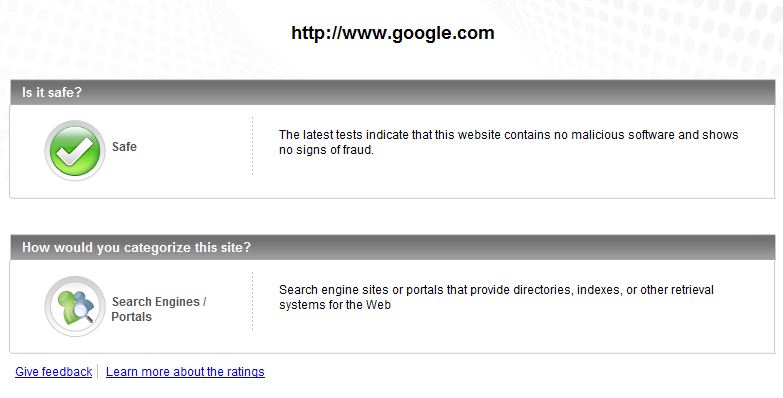
I have tested one of best webpage in the world google.com and one infected site [1] orgsite.info

You can see the results of different online webpage scanners below

AVG Online Webpage Scanner:

Google Webpage Result

orgsite.info Webpage Result

Norton Online Webpage Scanner:

Google Webpage Result

orgsite.info Webpage Result:

McAfee Online Webpage Scanner:

Google Webpage Result:

orgsite.info Webpage Result:


TrendMicro Online Webpage Scanner:

Google Webpage Result:

orgsite.info Webpage Result:


By these links, whenever you are having a doubt about newly visiting URL (Link), you can always check browse the content

References:

March 16, 2011

Schedule your GMail Messages. Send mails even you logged out of GMail.

Hi everyone,

Today I come across scheduling our GMail messages with browser extension.

Scheduling the mail is possible in GMail if you have Google Chrome or Firefox now.
Even you logout of the GMail, it will automatically send the mail at the scheduled time.

Just follow these steps to schedule your e-mail.

1) Download these extension in Google Chrome or Mozilla Firefox browser and follow the instructions.
http://www.boomeranggmail.com/download.html
2) Click on Boomerang link (Top-Right, Before your mail id name)
3) New window will be opened, Click on Allow button.
4) In GMail, Compose one new message with subject and content.
5) Click on Send Later (After Send Button) to schedule your mail.
6) If you want to send at specific time, first save the message and select "At Specific Time".
7) Select Date and give the Time in the following format
mm/dd/yyyy hh:mi AM/PM
8) Click on confirm button.
9) You can see your scheduled messages in Boomerang-Outbox folder in GMail or in Boomerang window, by clicking the Boomerang link on Top-Right of the window.


Please send your comments and feedback to psrdotcom@gmail.com

December 23, 2010

xps to pdf conversion

Hi everyone,
There are many ways to convert XPS to PDF conversion.
  1. Online site http://www.xps2pdf.org/
    • Browse the .xps file and click on "Convert" button.
    • It will convert the file to .pdf and gives a link.
    • To save the file: Right click on the link and select "Save Linked Content As"
  2. By using pdf printer
    •  Open the .xps file in either Internet Explorer or XPS Viewer.
    • Click on Print and select any pdf printer like Ayumini PDF Converter, novaPDF Converter etc.
    • Give the output file name 
  3. By using third party softwares
    • I am googling for trusted third party softwares. If I get I will share with you all

References:
http://www.verypdf.com/artprint/xps-to-pdf.htm
http://www.xpstopdf.com/
Get the xps viewer http://www.microsoft.com/korea/whdc/xps/viewxps.mspx

November 10, 2010

Have you tried these Google Labs features? I liked these features.

Hi everyone,
I tried these Google labs features and its very useful for every e-mail user. Hope you will also like it.

There are features which will
  1. Insert images in mail
  2. Cancel the mail within 30 seconds, if you forgot attachment, signature, address, etc.
  3. Nested folders
  4. Choosing the correct name suggestion.
  5. Displaying the unread messages count in the title of the page. 
If you want to use or like anyone of the above you can continue reading the blog.
  • To see the Google labs, click on Settings, select Labs tab.
  • Select the Enable option button for the concerned lab feature.
  • Click on Save Changes at top or bottom of the page, to use these features.


Google Labs Features: 

1) Inserting Images:
    This feature provides you to select the pictures from the harddisk or from URL and display in the mail instead of attachment. Lot of my friends asked how to display an image in the mail. By using this feature you can do that.
2) Nested Labels
    Instead of having long list of labels for every simple things, you can group them and make nested labels.
3) Title Tweaks
    It will display the current label with unread message count. If you get any new mail, just by seeing the title in the taskbar, you can identify that you got an e-mail.

4) Got the Wrong Bob?
    This feature will you recommend the user with the similar name. When you are selecting some name, it will list the similar names to choose the correct one. 

5) Undo Send
    Sometimes we will be thinking something and click on send button. After just clicking, we will be thinking like, I shouldn't have click on send button. By using "Undo Send" feature, within 30 seconds we can cancel the sending mail. After finishing everything in the mail, you can send again.
Example: We want to send resume to someone, We will be concentrating on writing some good content and once we are happy with content, we will just press send button without attaching the resume. Just after clicking on send we will identify that, we forgot the attachment. At that point, we can cancel the sending mail and attach the resume and send. I think it happened with lot of you people. It happened with me too.

--------------------------------------
Please send your feedback and comments
PSR.COM

Featured Post

Java Introdcution

Please send your review and feedback to psrdotcom@gmail.com