Showing posts with label Virus. Show all posts

February 21, 2012

Check Website Link (URL) for Safe Browsing to Prevent from Malicious Virus Attacks

Hi friends,

I downloaded a software. In "Readme.txt", I found a link and I would like to check how safe the link. Because, I was worried, what if, if I open the link and some virus installed automatically. So, I was searching for checking website URL (link) for safe browsing. I found that every Anti-Virus company got an option to do that.

Here you go and paste your Website URL (Link) for checking the content for safe browsing.

Online Webpage Virus Scanners:


Off-line Webpage Virus Scanners:


How the online webpage scanners works:

You need to copy the URL (Link) which you want to test for safe browsing.
Paste the URL (Link) in any of the online webpage scanners, and click on "Check" button if available or Press "Enter (Return)" button.
You will get the website (page) test report.
In some online webpage scanners, they have categorized the sites into groups and displaying that group.

Test Results:

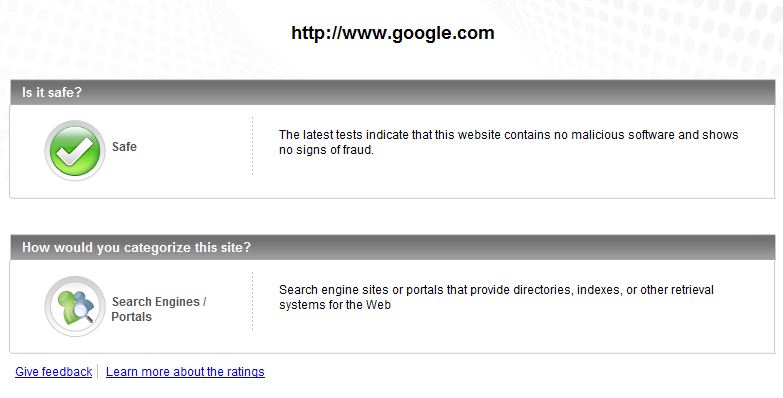
I have tested one of best webpage in the world google.com and one infected site [1] orgsite.info

You can see the results of different online webpage scanners below

AVG Online Webpage Scanner:

Google Webpage Result

orgsite.info Webpage Result

Norton Online Webpage Scanner:

Google Webpage Result

orgsite.info Webpage Result:

McAfee Online Webpage Scanner:

Google Webpage Result:

orgsite.info Webpage Result:


TrendMicro Online Webpage Scanner:

Google Webpage Result:

orgsite.info Webpage Result:


By these links, whenever you are having a doubt about newly visiting URL (Link), you can always check browse the content

References:

January 20, 2012

Protect Your USB Pen drive by making it Write Protect / Read Only Device in Windows from Viruses

Hi friends,

Today I have come across protecting the USB pen drive from viruses.

I found lot of useful stuff from internet. I just want to share my views on USB Pen drive protection

There are several to protect your pen drive from viruses. I found the following ways are useful.

Make the USB Pen drive Read-only or Writable:
  1. Installing a software which provides options
  2. Running the .reg files to edit the registry automatically
  3. Manually editing registry
1. Installing a software which provides options
Thumbscrew is a software which makes the drive read-only or writable with single click.

Please find the source of the Thumbscrew software from this link
http://www.irongeek.com/i.php?page=security/thumbscrew-software-usb-write-blocker&mode=print

The installation and usage of the Thumbscrew software are described in this blog
http://editecforum.blogspot.com/2008/06/make-your-usb-read-only-while-putting.html

2. Running the .reg files to edit the registry automatically
Download the .reg files from this link
http://www.shaplus.com/exes/guide/EnableOrDisableUSBWrite.zip

When you want to make device read-only then please run the EnableUSBWrite.reg and connect the device
When you want to make device writable then please run the DisableUSBWrite.reg and copy the content

For further more information on these .reg files, please visit their link
http://www.shaplus.com/guide/Computer_Internet/write-protect-usb-flash-drive.htm

Note: You can view the .reg file content by opening the file in notepad or any other text editor

3. Manually editing registry
If you want to do it manually to see how it will work, then you can do that also by following this procedure
http://blog.ashfame.com/2008/04/write-protect-usb-thumb-pen-drive/


Make your USB Pen drive a bit faster
By following this procedure you can make your pen drive to work faster compared to previous
http://www.labofweb.com/how-to-protect-pendrive-from-virus-prevent-the-entry-of-virus-to-your-usb-drive-and-increase-its-speed-of-perfomance-by-formating-it-in-ntfs-file-system-and-making-as-read-only/

Protect your pen drives from viruses
Block all the executable files from your pen drive from running virus
http://www.techtola.com/2008/01/ways-to-prevent-70-virus-malware.html

August 10, 2008

Sccfg.sys Hidden File Virus Removal Procedure

Virus Name: Hidden File Virus.


AIM of Virus: We can't find our hidden files if its infected.


Solution:
  1. We need to install Anti-Virus software if your system not having any anti-software.
  2. After installing the anit-virus or if installed already once you scan the entire system.
  3. Run-->regedit and press enter
  4. It will show the registry editor
  5. MyComputer/HKEY_LOCAL_MACHINE/SOFTWARE/Microsoft/Windows/CurrentVersion/Explorer/Advanced/Folder/Hidden/NOHIDDEN
  6. The values must be this for Checked Value is 2, Default Value is 2
  7. If the values are not matching with u r system registry editor then you please doubleclick on that and edit the data.
  8. MyComputer/HKEY_LOCAL_MACHINE/SOFTWARE/Microsoft/Windows/CurrentVersion/Explorer/Advanced/Folder/Hidden/SHOWALL
  9. The values must be this for Checked Value is 1, Default Value is 2
  10. If the values are not matching with u r system registry editor then you please doubleclick on that and edit the data.
  11. Now you check whether its showing the hidden files in your system. To view the hidden files. Click on MyComputer-->Tools-->FolderOptions-->view-->Show Hidden Files-->Click on Apply-->Click on OK
  12. Run-->msconfig
  13. Please in startup tab deselect amvo and regsvr processes and click on Apply then click OK
  14. Antivirus automatically detect the virus now
  15. Restart your system and then scan again

Virus Name: sccfg.sys


AIM of Virus: It wont detect the infected pendrives.


Solution:
  1. Identify the path of the file
  2. Create a file in notepad and save the file with name sccfg.sys and It will ask you to replace the existing file.
  3. Click on Ok
  4. Scan your computer and Restart

Featured Post

Java Introdcution

Please send your review and feedback to psrdotcom@gmail.com