Showing posts with label Hide. Show all posts

June 04, 2014

PhoneGap/Cordova iOS App Full Screen/Hide Status Bar completly

Hi Friends,

When we are working with cross platform application development like PhoneGap/Cordova, we might be facing issue with status bar.

Problem:
Status bar comes on the application though we want to have app in a full screen.

iOS Solution:
  • Add the following 2 keys in .plist file
    • view controller-based status bar appearance: NO
    • status bar is initially hidden : YES

I hope this will help you solving your issue.

Please send your feedback and comments to psrdotcom@gmail.com

February 28, 2012

Simple Steganography to hide file(s) under an image in Windows

Hi all,

Do you want to hide your files under an image to secure important data? That is called Steganography.

In Windows with "copy" command, it is possible.

Pre-Requisites:
An image file with any image file extension .jpg, .png etc
A File to hide in any format
An archive file manager like WinRAR, 7-Zip etc.


Procedure:

We will be explaining with sample example and the following files will be used in the explanation.

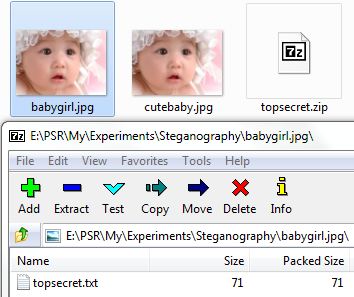
cutebaby.jpg -> Cover Image, which hides the data file
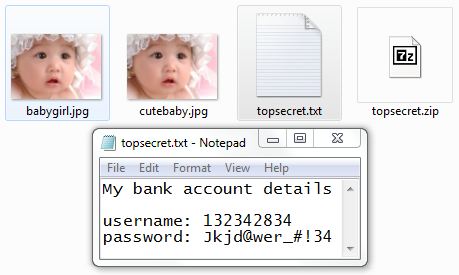
topsecret.txt -> file to be hidden
babygirl.jpg -> stego image, which contains hidden data file
E:\PSR\My\Experiments\Steganography -> Working Folder


  • After arranging the pre-requisites as above shown, archive your data file (file to hide). In this example, it is "topscret.txt"


  • Now you will be getting the archive file named "topscret.zip" in the file explorer
  • Open Command Prompt and Navigate to the corresponding folder. In this example
  • Delete the "topscret.txt" by using the "del" commad
  • Now, run the copy command with the following syntax 
    • Syntax: copy /b +  
    • Example: copy /b cutebaby.jpg + topsecret.txt babygirl.jpg
  • It will create an image file which contains hidden data file in it.
  • To view the stored data file from the image, open the image file from archive viewer.
  • Specify the path to extract
  • Click on "Extract" button
  • View the file list from Windows explorer and/or command prompt
  • Check the data file content
Note:
  • The stego image file size would be more than the data file + cover image file size
  • Any one can view the data file if they know that data file is hidden under the cover image
 
If you have any queries, send mail to psrdotcom@gmail.com

January 30, 2012

Hide/Unhide Microsoft Excel 2007 Rows/Columns to Protect your data

Hi Friends,
Do you want to hide[protect] the data then please follow the steps

Step 1: User left click in "Microsoft Excel - Book1"
Step 2: User mouse drag start in "Microsoft Excel - Book1" to select the rows
Step 3: User mouse drag end in "Microsoft Excel - Book1" to finish the row selection

Step 4: User right click on any of the selected row number in "Microsoft Excel - Book1" to get the row selection menu

Step 5: User left click on "Hide (menu item)" to hide the rows along with data

Step 6: User right click in "Microsoft Excel - Book1" to unhide the hidden rows

Step 7: User left click on "Unhide (menu item)" to get the data back

Step 8: Now User can see the rows along with the data

Step 9: User right click in "Microsoft Excel - Book1" to see the column selection pop-up menu

Step 10: User left click on "Hide (menu item)" to hide the columns along with the data

Step 11: User right click in "Microsoft Excel - Book1" to get the pop-up

Step 12: User left click on "Unhide (menu item)" to get the data back

Step 13: See the unhidden columns along with data now


Featured Post

Java Introdcution

Please send your review and feedback to psrdotcom@gmail.com