Showing posts with label Robin. Show all posts

February 19, 2020

Nginx Load Balancing Configuration

Hi folks,

I am going to explain the process of load balancing the web application using Nginx

Pre-requisites


  • One machine with Nginx installation
  • Two machines with running the same web application

Test setup

All are Ubuntu server machines

  1. 10.10.1.1 - Load Balancer
  2. 10.10.1.2 - Node 1
  3. 10.10.1.3 - Node 2


Configuration

In the Nginx server machine (10.10.1.1) do the following load balancing configuration


  • Make sure you stop the nginx server if running

$ sudo service nginx stop

  • Edit the nginx.conf file 

$ sudo vi /etc/nginx/nginx.conf

  • Place the following sample content

http {
        upstream testsetup {
        server 10.10.1.2;
        server 10.10.1.3;
}
    server{
        listen 8090;
        server_name testsetup;
        location / {
            proxy_pass http://testsetup;
        }
    }
}

  • Start the Nginx server

$ sudo service nginx start

Load Balancing Test


  1. Access the 10.10.1.1:8090 in the web browser
  2. It will redirect to Node 1 (10.10.1.2)
  3. Refresh/Reload the page, the load balancer redirects to Node 2 (10.10.1.3)

Tip

To differentiate the web server, add a footer with different content (Static IP Address) in your index.html


Please send your comments and feedback to psrdotcom@gmail.com

February 11, 2020

Load balancing with IIS ARR Server Farm

Hi Folks,

I am going explain how can you create a software load balancer with IIS Web Server.
This method is HTTP based load balancing.

Pre-requisites


  1. IIS 7 and above
  2. ARR (Application Request Routing) https://www.iis.net/downloads/microsoft/application-request-routing
  3. Minimum two application servers, preferably running on two different machines

Create ServerFarm


  1. After installing the ARR, you should be able to see "Server Farms" in your IIS Server
  2. Right click on "Server Farms" and select "Create Server Farm"
  3. Give a name to the ServerFarm
  4. You would be navigate to "Add Server" Page
  5. Enter the application server/ip address and click on "Add"
  6. Repeat again to add two or more servers
  7. Check the status of the servers in "Server Address and Status" box
  8. Click on "Ok"

Configure Load Balance


  1. Select the created ServerFarm
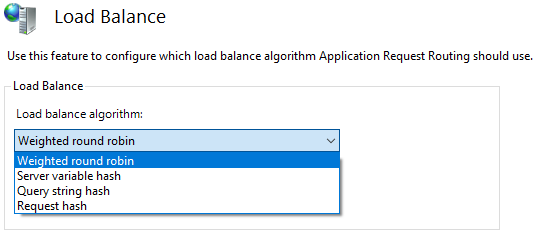
  2. Double click on the "Load Balance" item
  3. Choose the following based on your requirement.
  4. The default configuration as follows
    • Load balance algorithm: Weighted round robin
    • Load distribution: Even distribution


Based on the load balance algorithm, the load distribution options would be changed, if applicable.

Routing Rules Configuration


  1. Select the created ServerFarm
  2. Double click on the "Routing Rules" item

Monitor and Manage the servers

  1. Select the created ServerFarm
  2. Double click on the "Monitor and Management" item

Restart IIS

Once you have completed all the steps, perform the following to make sure everything is in sync.
  1. Open powershell in administrator mode
  2. Run the following commands
    1. net stop was /y
    2. net start w3svc


Please send your feedback and comments to psrdotcom@gmail.com

Featured Post

Java Introdcution

Please send your review and feedback to psrdotcom@gmail.com