Showing posts with label HTTP. Show all posts

November 06, 2025

Migrate from Nginx to Caddy for SSL auto-renewal in Amazon AWS EC2

 Dear friends,

Today, we will see a simple migration with less configuration of SSL auto-renewal.

I was using Nginx for SSL auto-renewal using certbot. Every 90 days, the renewal code should run, I made one more service it.

I have come across Caddy, which does an auto-renewal of SSL automatically with certbot. Reducing efforts and making the system smooth.

Follow the steps below

Stop and disable the Nginx

sudo systemctl stop nginx

sudo systemctl disable nginx

Install the Caddy

In EC2, if you are running Amazon Linux, then execute the following to install Caddy.

    sudo yum -y install yum-plugin-copr

    sudo yum -y copr enable @caddy/caddy epel-8-$(arch)

    sudo yum -y install caddy

Edit and configure the Caddyfile

Usually, it will be in the path /etc/caddy/Caddyfile

sudo vi /etc/caddy/Caddyfile

I have only one server that is running locally. So, my configuration is easy

domain_name {

    reverse_proxy localhost:port

}

You can configure more with your existing Nginx sites-enabled reference.

Happy SSLing.

If you like the blog or want to comment, kindly reach out to psrdotcom@gmail.com


March 03, 2020

Run local file server with NPM http-server

Hi folks,

Today i'll explian the process of making your folder as a standalone file server.

Objective

Make my folder contents browse over http

Procedure


  • Install Node
  • Install http-server module in node globally
    • npm install -g http-server
  • Open terminal/command-prompt
  • Navigate to your folder
  • Run the following command to start the server
    • http-server .
  • or simply run
    • hs .
  • Run from anywhere with full path of the folder
    • hs C:\FileFolder
  • Starting up http-server, serving .
  • Available on:
    • http://10.10.6.2:8080
    • http://127.0.0.1:8080
    • http://youripaddress:8080
  • Hit CTRL-C to stop the server
  • You should be able to browse your file folder contents with any of the above URLs
Hope you are able to access your file contents over the browser

Tip: Using this approach, you can share your content over intranet/internet with full control over data as read only.

After stopped the server, access to the folder is stopped.

Please send your comments and feedback to psrdotcom@gmail.com

February 11, 2020

Load balancing with IIS ARR Server Farm

Hi Folks,

I am going explain how can you create a software load balancer with IIS Web Server.
This method is HTTP based load balancing.

Pre-requisites


  1. IIS 7 and above
  2. ARR (Application Request Routing) https://www.iis.net/downloads/microsoft/application-request-routing
  3. Minimum two application servers, preferably running on two different machines

Create ServerFarm


  1. After installing the ARR, you should be able to see "Server Farms" in your IIS Server
  2. Right click on "Server Farms" and select "Create Server Farm"
  3. Give a name to the ServerFarm
  4. You would be navigate to "Add Server" Page
  5. Enter the application server/ip address and click on "Add"
  6. Repeat again to add two or more servers
  7. Check the status of the servers in "Server Address and Status" box
  8. Click on "Ok"

Configure Load Balance


  1. Select the created ServerFarm
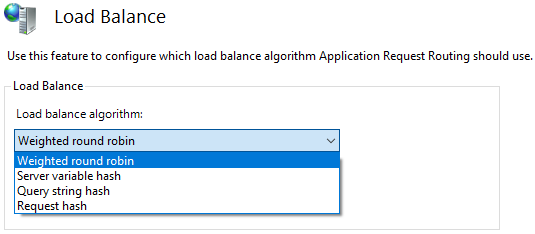
  2. Double click on the "Load Balance" item
  3. Choose the following based on your requirement.
  4. The default configuration as follows
    • Load balance algorithm: Weighted round robin
    • Load distribution: Even distribution


Based on the load balance algorithm, the load distribution options would be changed, if applicable.

Routing Rules Configuration


  1. Select the created ServerFarm
  2. Double click on the "Routing Rules" item

Monitor and Manage the servers

  1. Select the created ServerFarm
  2. Double click on the "Monitor and Management" item

Restart IIS

Once you have completed all the steps, perform the following to make sure everything is in sync.
  1. Open powershell in administrator mode
  2. Run the following commands
    1. net stop was /y
    2. net start w3svc


Please send your feedback and comments to psrdotcom@gmail.com

Featured Post

Java Introdcution

Please send your review and feedback to psrdotcom@gmail.com